Tic Tac Toe in Java
A step-by-step tutorial for implementing Tic Tac Toe via the console.
This tutorial was originally written when I was first learning Java. I've kept the original code below as a time capsule of my learning journey. If you want to see how I would write this today, with proper input validation and error handling, check out the interactive demo and retrospective at the bottom.
About This Tutorial
Tic Tac Toe is a classic programming problem that many developers encounter on their programming journey. Deceptively simple, Tic Tac Toe can teach developers essential programming concepts while building a complete, functional game.
What You'll Learn:
- Arrays and 2D array manipulation
- Boolean logic and conditionals
- Functions and method design
- Loop structures and game flow
- User input validation
- Game state management
This tutorial uses the most basic solution to make it accessible to all skill levels. We'll build everything in one class with several functions, focusing on clarity and learning rather than advanced design patterns.
Always remember to test your code at the end of each section to make sure it works!
Prerequisites
Before starting this tutorial, make sure you have:
- Java JDK 11 or higher — This tutorial uses basic Java features that work with any modern version. Download from Oracle or use OpenJDK.
- A text editor or IDE — Any editor works, but VS Code with the Java Extension Pack or IntelliJ IDEA Community Edition will give you syntax highlighting and error checking.
- Basic Java knowledge — You should be comfortable with variables, data types, and how to compile/run a Java program. If
System.out.println("Hello")looks familiar, you're ready.
Ensure you have Java installed. To check your Java version, open a terminal and run java -version.
Building the Board
The first step in building our game is to create the board. We'll use a 2D character array filled with dashes, vertical bars, and spaces to create our visual board.
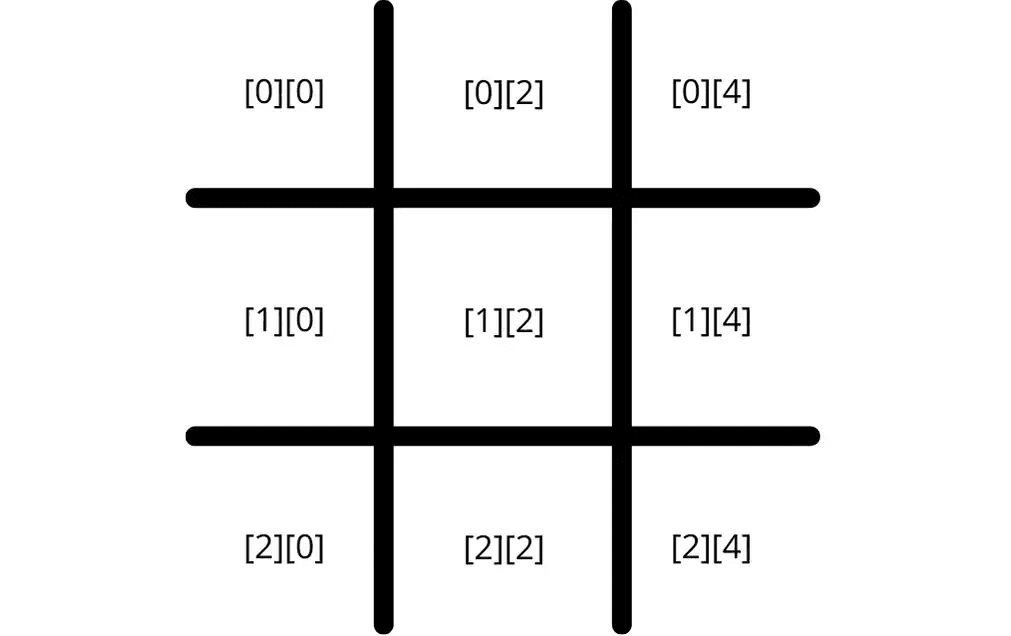
Array Indexing: Valid game positions correspond to these array indices:
- Top row: [0][0], [0][2], [0][4]
- Middle row: [1][0], [1][2], [1][4]
- Bottom row: [2][0], [2][2], [2][4]
The vertical bars exist for visual formatting but aren't used in game logic.
public class TicTacToe {
    public static void main(String[] args) {

        char[][] gameBoard = {
            {'_','|','_','|','_'},
            {'_','|','_','|','_'},
            {' ','|',' ','|',' '}
        };

        printBoard(gameBoard);
    }

    public static void printBoard(char[][] gameBoard) {
        for (char[] row : gameBoard) {
            for (char c : row) {
                System.out.print(c);
            }
            System.out.println();
        }
    }
}
Placing Pieces
Now that we have our board, let's establish the game rules and create a method to place pieces on the board.
Game Rules:
- The player will be represented by the
Xcharacter and the number1 - The computer will be represented by the
Ocharacter and the number2 - Valid indices for placing pieces are the positions noted above
Try these function calls in your main method to see pieces placed on the board:
updateBoard(5, 1, gameBoard); // Player X in center
updateBoard(1, 2, gameBoard); // Computer O in top-left
updateBoard(7, 1, gameBoard); // Player X in bottom-left
Getting Player Input
Now we need to allow the player to tell us where they want to place their pieces. We'll create a playerMove() function that uses the Scanner class to retrieve user input.
import java.util.Scanner;

public class TicTacToe {

    // Static Scanner for reuse across methods
    static Scanner input = new Scanner(System.in);

    public static void main(String[] args) {
        char[][] gameBoard = {
            {'_','|','_','|','_'},
            {'_','|','_','|','_'},
            {' ','|',' ','|',' '}
        };

        playerMove(gameBoard);
    }

    public static void playerMove(char[][] gameBoard) {
        System.out.println("Please make a move. (1-9)");
        int move = input.nextInt();
        updateBoard(move, 1, gameBoard);
    }
}Static Scanner: We create a static Scanner object because we'll use player input in multiple methods. Having one instance prevents memory issues and simplifies our code structure.
Validating Moves
If you test the current code, you'll notice players can place pieces on top of existing pieces. We need to validate moves before placing them on the board.
Valid Move Rules:
- Moves must be between 1-9
- The selected position must be empty (contain
_or' ') - Cannot place pieces on vertical bars or occupied spaces
Checkpoint: At this point, you have a working board that accepts and validates player input. Test it by running the game and trying to place pieces in the same spot twice—it should reject the second move.
Simulating the Computer
To keep things simple, we'll simulate the computer using a random number generator. The computer will choose random valid moves.
import java.util.Random;

public static void computerMove(char[][] gameBoard) {
    Random rand = new Random();
    boolean validMove = false;

    while (!validMove) {
        int move = rand.nextInt(9) + 1; // Random number 1-9
        validMove = isValidMove(move, gameBoard);
        if (validMove) {
            System.out.println("Computer chose position: " + move);
            updateBoard(move, 2, gameBoard);
        }
    }
}Random Number Generation: The expression rand.nextInt(9) + 1 generates numbers 1-9. The
nextInt(9) method returns 0-8, so we add 1 to get our desired range.
Winning the Game
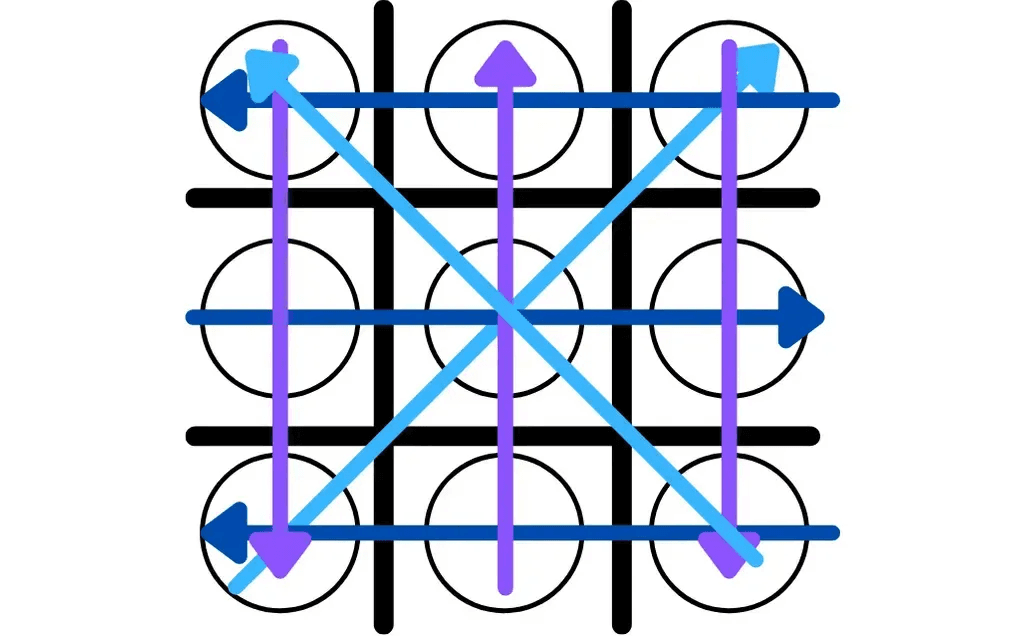
Now we need to determine when the game ends. Following traditional Tic Tac Toe rules, there are 8 winning conditions plus 1 tie condition.
Creating the Game Loop
Finally, we need to create the main game loop that allows players to play multiple games and handles the turn-based gameplay.
Congratulations! You now have a complete, functional Tic Tac Toe console game written in Java. Try adding features like a scoring system, difficulty levels, or a graphical interface!
Complete Code
Here's the full implementation with all methods combined. Copy this to run the complete game:
Try It Yourself
Here's an interactive version of the game built with React. It includes the improvements discussed in the retrospective below: robust input handling, help commands, and score tracking.
Commands: Type 1-9 to make a move, help for options, score to see the score, or play to
restart.
2025 Retrospective
Looking back at this code four years later, it's a great example of "making it work" vs. "making it maintainable." While the logic holds up, there are three key areas I would change today:
1. Separation of Concerns
The original code mixes game data (X and O) with visual formatting (pipes | and underscores _)
in the same array. This makes the logic fragile. If you wanted to change how the board looks, you
risk breaking the game math.
Today's approach: Keep the data in a 3x3 char[][] array and handle visuals strictly in the
printBoard() method.
// Clean data model
private static char[][] board = new char[3][3];

// Visuals handled separately
private static void printBoard() {
    System.out.println("-------");
    for (int i = 0; i < 3; i++) {
        System.out.print("|");
        for (int j = 0; j < 3; j++) {
            char c = (board[i][j] == 0) ? ' ' : board[i][j];
            System.out.print(c + "|");
        }
        System.out.println("\n-------");
    }
}
2. Input Robustness
The original input.nextInt() crashes if a user types a letter. We should handle
invalid input gracefully.
Today's approach: Read input as a String and parse it with error handling.
private static int getPlayerInput() {
    while (true) {
        String line = input.nextLine().trim().toLowerCase();

        if (line.equals("help")) {
            System.out.println("Commands: 1-9 (move), score, help");
            continue;
        }
        if (line.equals("score")) {
            System.out.println("Player: " + playerScore + " | Computer: " + computerScore);
            continue;
        }

        try {
            int move = Integer.parseInt(line);
            if (move >= 1 && move <= 9) return move;
            System.out.println("Please enter a number between 1-9.");
        } catch (NumberFormatException e) {
            System.out.println("Invalid input. Enter 1-9 or 'help'.");
        }
    }
}
3. Algorithmic Efficiency
The massive switch statements work, but they're hard to read and maintain. Simple coordinate math can replace 50+ lines with 2 lines.
Today's approach: Use math to convert positions 1-9 to row/column indices.
// Position 1-9 maps to row/col
// (position - 1) / 3 = row
// (position - 1) % 3 = column

private static boolean isValidMove(int position) {
    int row = (position - 1) / 3;
    int col = (position - 1) % 3;
    return board[row][col] == ' ';
}

private static void updateBoard(int position, char symbol) {
    int row = (position - 1) / 3;
    int col = (position - 1) % 3;
    board[row][col] = symbol;
}
What This Teaches
This retrospective isn't about the original code being "wrong". It reached 75,000+ developers and helped them build something real. That's success.
The switch statements are verbose, yes. But a beginner can read case 5: gameBoard[1][2] and understand exactly what's happening. The coordinate math (position - 1) / 3 is elegant, but it's a puzzle you have to work backwards to understand.
Good documentation meets people where they are.
A tutorial for beginners should prioritize clarity over cleverness. The original code did that. The improvements I'd make today—input validation, separation of concerns—aren't about making the code "smarter." They're about making it more robust and maintainable.
The real lesson? Code evolves with context:
The interactive demo above uses a "production" mindset. The original tutorial uses the "learning" mindset. Both are valid—for their audience.